Wednesday, March 10, 2021

Java Interview Questions

 1. Fail Fast and Fail-Safe

      Ans- Fail Fast- iterator over-collection and removing the element from the collection.

       fail-safe is a concurrent package because use a copy of the collection


2. Why use generics

Ans- In Generics Type parameters provide a way for you to re-use the same code with different inputs


3. Comparable and Comparator

Comparable

Comparator

1) Comparable provides a single sorting sequence. In other words, we can sort the collection on the basis of a single element such as id, name, and price.

The Comparator provides multiple sorting sequences. In other words, we can sort the collection on the basis of multiple elements such as id, name, and price etc.

2) Comparable affects the original class, i.e., the actual class is modified.

Comparator doesn't affect the original class, i.e., the actual class is not modified.

3) Comparable provides compareTo() method to sort elements.

Comparator provides compare() method to sort elements.

4) Comparable is present in java.lang package.

A Comparator is present in the java.util package.

5) We can sort the list elements of Comparable type by Collections.sort(List) method.

We can sort the list elements of Comparator type by Collections.sort(List, Comparator) method.

*image source- https://www.javatpoint.com/difference-between-comparable-and-comparator


Monday, April 13, 2020

Last Stone Weight


We have a collection of stones, each stone has a positive integer weight.

Each turn, we choose the two heaviest stones and smash them together. Suppose the stones have weights x and y with x <= y. The result of this smash is:
If x == y, both stones are totally destroyed;
If x != y, the stone of weight x is totally destroyed, and the stone of weight y has new weight y-x.

At the end, there is at most 1 stone left. Return the weight of this stone (or 0 if there are no stones left.)


class LastStoneWeight
{
     public int lastStoneWeight(int[] stones)
     {
        PriorityQueue<Integer>  pq= new PriorityQueue<Integer>(Collections.reverseOrder());
     
       for(int item:stones)
      {
           pq.offer(item);
      }

      while(pq.size()>1)
      {
           pq.offer(pq.poll()-pq.poll());
       }
           return pq.peek();
      }
}

Friday, April 10, 2020

Single Number


Given a non-empty array of integers, every element appears twice except for one. Find that single one.

Example 1: Input: [2,2,1] 
Output: 1
Example 2: Input: [4,1,2,1,2] 
Output: 4

class SingleNumber
{
   public int singleNumber(int[] nums) 
  {
     int x=nums[0];
     for(int i=1;i<nums.length;i++)
     {
         x=x^nums[i];
      }

     return x;
    }

}


Friday, October 21, 2016

Execute failed: java.io.IOException: Cannot run program "wsgen": CreateProcess error=2,

I was running the Ant build for a small webservice standalone program I was getting below error -

Buildfile: C:\workspace\WebserviceExample\build.xml
wsgen:

BUILD FAILED
C:\workspace\WebserviceExample\build.xml:5: Execute failed: java.io.IOException: Cannot run program "wsgen": CreateProcess error=2, The system cannot find the file specified

Total time: 413 milliseconds

This was my build.xml file-

<project default="wsgen">
 
 <target name="wsgen" >
   
  <exec executable="wsgen">
      
   <arg line="-cp ./bin -keep -s ./src -d ./bin com.myfirst.wsServer.SayHello"/>
      
  </exec>
      
 </target>
 
</project>


After providing the complete path for wsgen in exec tag it worked like a charm-

<project default="wsgen">
 
 <target name="wsgen" >
   
  <exec executable="C:\Program Files\Java\jdk1.7.0_79\bin\wsgen">
      
   <arg line="-cp ./bin -keep -s ./src -d ./bin com.myfirst.wsServer.SayHello"/>
      
  </exec>
      
 </target>
 
</project>

Hope it will help.


Thursday, February 11, 2016

Pre-installed MYSQL Server and WAMP MYSQL Server clash due to same port

I was having issue with installing WAMP server. Every things looks fine to me but WAMP server didn't turned to Green from yellow. Tried all the way available on google but didn't work.

Initially I thought it may be due to Apache server port, look for service using 80 port but there was none. Then I look more closely and it seems my Apache server is running fine it is my pre-installed MySQL server which was causing the conflict between WAMP MySql server

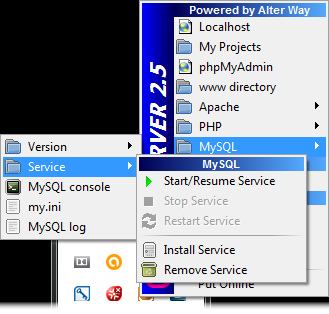
Stopped Mysql server-


Started MySQL server is still having Start/Resume Service as green-


While Started Apache server had Start/Resume Services as grey-


I opened the my.ini file and look for the port number and changed from default 3306 to 3305 or it can be any free avialable port.
[mysqld]
port=3306
changed to 
port=3305

It worked like charm for me. Hope someone also might get help from this blog.


MySQL said: Documentation #1045 - Access denied for user 'root'@'localhost' (using password: NO)


While installing the WAMP server I was having the issue of MYSQL connection as I had provided my own passward in MYSQL-

1045 - Access denied for user 'root'@'localhost' (using password: NO)  error when typing http://localhost/phpmyadmin in browser.
Solution:
Go to file C:\wamp\apps\phpmyadmin4.1.14\config.inc.php
Go to the line $cfg['Servers'][$i]['password']='' and change this to
$cfg['Servers'][$i]['password']='NO'
Try opening phpMyAdmin again, and hopefully  message will read as "Access denied for user 'root'@'localhost' (using password: YES)
Now change the password in the above line to 'yourpassword' (whatever you had set it to before)

And here we go-


Friday, October 9, 2015

Reading Excel FIle and Sorting Data with Column Name and It's key Value with User Slection


User Provided Selection-
FileName which need to be loaded:
SheetName:
Row data which is selected:
Return Map with Column name and selected/desired Data-

Excel File Looklike-

UserStateUserIDLoginIDSecure/Unsecured InBoundToInboundFrom
Avaliable,  1000654789U258963147852
UnAvaliable1001123456S147852258963

import java.io.File;
import java.io.FileInputStream;
import java.io.IOException;
import java.nio.file.FileSystems;
import java.nio.file.Files;
import java.nio.file.Path;
import java.nio.file.StandardCopyOption;
import java.util.HashMap;
import java.util.Iterator;
import java.util.LinkedHashMap;
import java.util.LinkedList;
import java.util.List;
import java.util.ListIterator;
import java.util.Map;
import java.util.Map.Entry;

import org.apache.poi.ss.usermodel.Cell;
import org.apache.poi.xssf.usermodel.XSSFCell;
import org.apache.poi.xssf.usermodel.XSSFRow;
import org.apache.poi.xssf.usermodel.XSSFSheet;
import org.apache.poi.xssf.usermodel.XSSFWorkbook;

public class ExcelReader
{
    HashMap testData = new HashMap();

    TestVO testVO = new TestVO();

    private HashMap loadCSVLines(File fileName)
    {
        // Used the LinkedHashMap and LikedList to maintain the order
        HashMap<String, LinkedHashMap<Integer, List>> outerMap = new LinkedHashMap<String, LinkedHashMap<Integer, List>>();

        LinkedHashMap<Integer, List> hashMap = new LinkedHashMap<Integer, List>();

        String sheetName = null;
        // Create an ArrayList to store the data read from excel sheet.
        // List sheetData = new ArrayList();
        FileInputStream fis = null;
        try
        {
            fis = new FileInputStream(fileName);
            // Create an excel workbook from the file system
            XSSFWorkbook workBook = new XSSFWorkbook(fis);
            // Get the first sheet on the workbook.
            for (int i = 0; i < workBook.getNumberOfSheets(); i++)
            {
                XSSFSheet sheet = workBook.getSheetAt(i);
                // XSSFSheet sheet = workBook.getSheetAt(0);
                sheetName = workBook.getSheetName(i);

                Iterator rows = sheet.rowIterator();
                while (rows.hasNext())
                {
                    XSSFRow row = (XSSFRow) rows.next();
                    Iterator cells = row.cellIterator();

                    List data = new LinkedList();
                    while (cells.hasNext())
                    {
                        XSSFCell cell = (XSSFCell) cells.next();
                        cell.setCellType(Cell.CELL_TYPE_STRING);
                        data.add(cell);
                    }
                    hashMap.put(row.getRowNum(), data);

                    // sheetData.add(data);
                }
                outerMap.put(sheetName, hashMap);
                hashMap = new LinkedHashMap<Integer, List>();
            }

        }
        catch (IOException e)
        {
            e.printStackTrace();
        }
        finally
        {
            if (fis != null)
            {
                try
                {
                    fis.close();
                }
                catch (IOException e)
                {
                    // TODO Auto-generated catch block
                    e.printStackTrace();
                }
            }
        }

        return outerMap;

    }

    public HashMap loadXLSTestData(String lob)
    {

        // HashMap testData = null;
        Path desktop = FileSystems.getDefault().getPath(
                System.getProperty("user.home") + "/Desktop");
        File file = new File(desktop.toString() + "\\AutomationTestSuite");
        if (!file.exists())
        {
            if (file.mkdir())
            {
                System.out.println("Directory is created!");
            }
            else
            {
                System.out.println("Failed to create directory!");
            }
        }
        Path oriPath = FileSystems.getDefault().getPath("src/com/aon/automation/properties",
                lob + "AutomationTestCases.xlsx");
        // Path copyPath =
        // FileSystems.getDefault().getPath(System.getProperty("user.home")+"/Desktop",
        // "SFAutomationTestCases.xlsx");
        Path copyPath = FileSystems.getDefault().getPath(file.toString(),
                lob + "AutomationTestCases.xlsx");
        File f = copyPath.toFile();

        if (!f.exists())
        {
            try
            {
                Files.copy(oriPath, copyPath, StandardCopyOption.COPY_ATTRIBUTES);
                System.out.println("Please update test data under path " + f
                        + " To run this test automation.");
            }
            catch (Exception e)
            {
                e.printStackTrace();
            }

        }
        else
        {
            testData = loadCSVLines(f);

        }
        return testData;
    }

    public HashMap XLSUtility(String lob, String testCase, String testDataRow)
    {
        loadXLSTestData(lob);
        List attributes = new LinkedList();
        HashMap returningMap = new LinkedHashMap();
        ListIterator iterateOverHeading = null;
        LinkedList valuesforMap = new LinkedList();
        Iterator excelSheetEntries = testData.entrySet().iterator();
        while (excelSheetEntries.hasNext())
        {
            Entry thisEntry = (Entry) excelSheetEntries.next();
            Object key = thisEntry.getKey();
            if (key.equals(testCase))
            {
                Map value = (LinkedHashMap) thisEntry.getValue();
                String str = null;
                Iterator iterateOverValue = value.entrySet().iterator();
                while (iterateOverValue.hasNext())
                {
                    Entry headings = (Entry) iterateOverValue.next();
                    Object headigKey = headings.getKey();
                    if (headigKey.equals(0))
                    {
                        attributes = (LinkedList) headings.getValue();

                    }
                    if (headigKey.toString().equals(testDataRow))
                    {
                        valuesforMap = (LinkedList) headings.getValue();

                        Iterator values = valuesforMap.iterator();

                        iterateOverHeading = attributes.listIterator();
                        INNER: while (iterateOverHeading.hasNext())
                        {
                            str = String.valueOf(iterateOverHeading.next());
                            while (values.hasNext())
                            {
                                String val = String.valueOf(values.next());
                                returningMap.put(str, val);
                                continue INNER;
                            }

                        }
                    }

                }

                break;
            }

        }
        System.out.println(returningMap);

        return returningMap;
    }


    public static void main(String[] args)
    {
        ExcelReader exl = new ExcelReader();

        exl.XLSUtility("SF", "InBound", "2");
    }
}

Thursday, October 8, 2015

Copy File From Project Path to Desktop with the Creation of Directory

Below code will copy the file from the working directory and it will also create the Directory on Desktop and copy the same file in newly created directory-


import java.io.File;
import java.nio.file.FileSystems;
import java.nio.file.Files;
import java.nio.file.Path;
import java.nio.file.StandardCopyOption;

public class GenericUtility
{

    public static void copyTestCase()
    {
     
       // It will look for the user home path and will get the desired path as provided, here we have                //chosen the Desktop
        Path desktop = FileSystems.getDefault().getPath( System.getProperty("user.home") + "/Desktop");

           //new directory will be created
        File file = new File(desktop.toString() + "\\TestSuite");
        if (!file.exists())
        {
            if (file.mkdir())
            {
                System.out.println("Directory is created!");
            }
            else
            {
                System.out.println("Failed to create directory!");
            }
        }
        Path oriPath = FileSystems.getDefault().getPath("src/com/javafries/automation/properties",
                "TestCases.xlsx");
        // Path copyPath =
        // FileSystems.getDefault().getPath(System.getProperty("user.home")+"/Desktop",
        // "TestCases.xlsx");
        Path copyPath = FileSystems.getDefault().getPath(file.toString(),
                "TestCases.xlsx");
   
        if (!f.exists())
        {
            try
            {
                Files.copy(oriPath, copyPath, StandardCopyOption.COPY_ATTRIBUTES);
            }
            catch (Exception e)
            {
                e.printStackTrace();
            }

        }

    }

    public static void main(String[] args)
    {
        copyTestCase();
    }
}

Reading the Excel file and Storing data in HashMap

Excel data is look like as below and having Multiple sheets-


UserState UserID LoginID Secure/Unsecured  InBoundTo InboundFrom
Avaliable,  1000654789U258963147852
UnAvaliable 1001 123456 S 147852 258963


import java.io.File;
import java.io.FileInputStream;
import java.io.IOException;
import java.util.HashMap;
import java.util.Iterator;
import java.util.LinkedHashMap;
import java.util.LinkedList;
import java.util.List;

import org.apache.poi.ss.usermodel.Cell;
import org.apache.poi.xssf.usermodel.XSSFCell;
import org.apache.poi.xssf.usermodel.XSSFRow;
import org.apache.poi.xssf.usermodel.XSSFSheet;
import org.apache.poi.xssf.usermodel.XSSFWorkbook;

public class ExcelReader
{

    public static HashMap loadExcelLines(File fileName)
    {
        // Used the LinkedHashMap and LikedList to maintain the order
        HashMap<String, LinkedHashMap<Integer, List>> outerMap = new LinkedHashMap<String, LinkedHashMap<Integer, List>>();

        LinkedHashMap<Integer, List> hashMap = new LinkedHashMap<Integer, List>();

        String sheetName = null;
        // Create an ArrayList to store the data read from excel sheet.
        // List sheetData = new ArrayList();
        FileInputStream fis = null;
        try
        {
            fis = new FileInputStream(fileName);
            // Create an excel workbook from the file system
            XSSFWorkbook workBook = new XSSFWorkbook(fis);
            // Get the first sheet on the workbook.
            for (int i = 0; i < workBook.getNumberOfSheets(); i++)
            {
                XSSFSheet sheet = workBook.getSheetAt(i);
                // XSSFSheet sheet = workBook.getSheetAt(0);
                sheetName = workBook.getSheetName(i);

                Iterator rows = sheet.rowIterator();
                while (rows.hasNext())
                {
                    XSSFRow row = (XSSFRow) rows.next();
                    Iterator cells = row.cellIterator();

                    List data = new LinkedList();
                    while (cells.hasNext())
                    {
                        XSSFCell cell = (XSSFCell) cells.next();
                        cell.setCellType(Cell.CELL_TYPE_STRING);
                        data.add(cell);
                    }
                    hashMap.put(row.getRowNum(), data);

                    // sheetData.add(data);
                }
                outerMap.put(sheetName, hashMap);
                hashMap = new LinkedHashMap<Integer, List>();
            }

        }
        catch (IOException e)
        {
            e.printStackTrace();
        }
        finally
        {
            if (fis != null)
            {
                try
                {
                    fis.close();
                }
                catch (IOException e)
                {
                    // TODO Auto-generated catch block
                    e.printStackTrace();
                }
            }
        }

        return outerMap;

    }
}


OuterMap will return the data of all your sheets in HashMap

as below-

HashMap of HashMap
Sheet1 as Key and its corresponding data as hashmap with row no as key and corresponding data in list

{Sheet1={
    0=[UserState, UserID, LoginID, Secure/Unsecured, InBoundTo, InboundFrom], 
    1=[Avaliable, 1000, 654789, U, 258963, 147852, ], 
    2=[UnAvaliable, 1000, 123456, S, 147852, 258963, ], 3=[], 4=[], 5=[]}, 
    
  Sheet2 as Key and its corresponding data as hashmap with row no as key and corresponding data in list  
Sheet2={
    0=[UserID, Password, Extention, ACDID, Env, Life_Cycle, Web_URL], 
    1=[XYZ, xyz, 71000, 66001, Cisco, DEV, https://www.facebook.com/, ], 
    2=[ABC, abc, 71000, 66001, Cisco, DEV, https://www.facebook.com/, ], 3=[, , ], 7=[, ]}, 
    
 Sheet3 as Key and its corresponding data as hashmap with row no as key and corresponding data in list   
Sheet3={
    0=[Outbound, State, ClientID, PPID, SecurityState], 
    1=[7777777, Avaliable, 0000, 8888, U, ], 
    2=[777777, Avaliable, 0000, 8888, S, ], 3=[, ]}, 


Sunday, August 9, 2015

WAS console error lang.ExceptionInInitializerError

Error Message: java.lang.Exception: java.lang.ExceptionInInitializerError
Error Code: 500
Target Servlet: action
Error Stack:
java.lang.Exception: java.lang.ExceptionInInitializerError
     at com.ibm.ws.webcontainer.servlet.ServletWrapper.loadServlet(ServletWrapper.java:2046)
     at com.ibm.ws.webcontainer.servlet.ServletWrapper.handleRequest(ServletWrapper.java:761)
     at com.ibm.ws.webcontainer.servlet.ServletWrapper.handleRequest(ServletWrapper.java:508)
     at com.ibm.ws.webcontainer.servlet.ServletWrapperImpl.handleRequest(ServletWrapperImpl.java:181)
     at com.ibm.ws.webcontainer.webapp.WebApp.handleRequest(WebApp.java:3994)
     at com.ibm.ws.webcontainer.webapp.WebGroup.handleRequest(WebGroup.java:276)
     at com.ibm.ws.webcontainer.WebContainer.handleRequest(WebContainer.java:945)
     at com.ibm.ws.webcontainer.WSWebContainer.handleRequest(WSWebContainer.java:1592)
     at com.ibm.ws.webcontainer.channel.WCChannelLink.ready(WCChannelLink.java:191)
     at com.ibm.ws.http.channel.inbound.impl.HttpInboundLink.handleDiscrimination(HttpInboundLink.java:454)
     at com.ibm.ws.http.channel.inbound.impl.HttpInboundLink.handleNewRequest(HttpInboundLink.java:516)
     at com.ibm.ws.http.channel.inbound.impl.HttpInboundLink.processRequest(HttpInboundLink.java:307)
     at com.ibm.ws.http.channel.inbound.impl.HttpInboundLink.ready(HttpInboundLink.java:278)
     at com.ibm.ws.tcp.channel.impl.NewConnectionInitialReadCallback.sendToDiscriminators(NewConnectionInitialReadCallback.java:214)
     at com.ibm.ws.tcp.channel.impl.NewConnectionInitialReadCallback.complete(NewConnectionInitialReadCallback.java:113)
     at com.ibm.ws.tcp.channel.impl.AioReadCompletionListener.futureCompleted(AioReadCompletionListener.java:175)
     at com.ibm.io.async.AbstractAsyncFuture.invokeCallback(AbstractAsyncFuture.java:217)
     at com.ibm.io.async.AsyncChannelFuture.fireCompletionActions(AsyncChannelFuture.java:161)
     at com.ibm.io.async.AsyncFuture.completed(AsyncFuture.java:138)
     at com.ibm.io.async.ResultHandler.complete(ResultHandler.java:204)
     at com.ibm.io.async.ResultHandler.runEventProcessingLoop(ResultHandler.java:775)
     at com.ibm.io.async.ResultHandler$2.run(ResultHandler.java:905)
     at com.ibm.ws.util.ThreadPool$Worker.run(ThreadPool.java:1662)
     Caused by: java.lang.ExceptionInInitializerError
     at java.lang.J9VMInternals.initialize(J9VMInternals.java:221)
     at java.lang.Class.forNameImpl(Native Method)
     at java.lang.Class.forName(Class.java:278)
     at java.beans.Beans.instantiate(Beans.java:189)
     at java.beans.Beans.instantiate(Beans.java:80)
     at com.ibm.ws.webcontainer.servlet.ServletWrapper$1.run(ServletWrapper.java:1977)
     at com.ibm.ws.security.util.AccessController.doPrivileged(AccessController.java:118)
     at com.ibm.ws.webcontainer.servlet.ServletWrapper.loadServlet(ServletWrapper.java:1968)
     ... 22 more
     Caused by: org.apache.commons.logging.LogConfigurationException: org.apache.commons.logging.LogConfigurationException: java.lang.ClassNotFoundException: org.apache.commons.logging.impl.Log4JLogger
     at org.apache.commons.logging.impl.LogFactoryImpl.newInstance(LogFactoryImpl.java:532)
     at org.apache.commons.logging.impl.LogFactoryImpl.getInstance(LogFactoryImpl.java:272)
     at org.apache.commons.logging.impl.LogFactoryImpl.getInstance(LogFactoryImpl.java:246)
     at org.apache.commons.logging.LogFactory.getLog(LogFactory.java:395)
     at org.apache.struts.action.ActionServlet.<clinit>(Unknown Source)
     at java.lang.J9VMInternals.initializeImpl(Native Method)
     at java.lang.J9VMInternals.initialize(J9VMInternals.java:199)
     ... 29 more
     Caused by: org.apache.commons.logging.LogConfigurationException: java.lang.ClassNotFoundException: org.apache.commons.logging.impl.Log4JLogger
     at org.apache.commons.logging.impl.LogFactoryImpl.getLogConstructor(LogFactoryImpl.java:416)
     at org.apache.commons.logging.impl.LogFactoryImpl.newInstance(LogFactoryImpl.java:525)
     ... 35 more
     Caused by: java.lang.ClassNotFoundException: org.apache.commons.logging.impl.Log4JLogger
     at java.lang.Class.forNameImpl(Native Method)
     at java.lang.Class.forName(Class.java:240)
     at org.apache.commons.logging.impl.LogFactoryImpl$1.run(LogFactoryImpl.java:466)
     at java.security.AccessController.doPrivileged(AccessController.java:359)
     at org.apache.commons.logging.impl.LogFactoryImpl.loadClass(LogFactoryImpl.java:454)
     at org.apache.commons.logging.impl.LogFactoryImpl.getLogConstructor(LogFactoryImpl.java:406)
     ... 36 more


Solution---

Make sure you have compatible ant-apache-log4j.jar, log4j, and commons-logging.jar.
Restart you server, it should work fine.


For me it worked :)


Tuesday, August 5, 2014

java.net.SocketException:

When I was trying to run my application I was getting below error
0    [Thread-5] INFO  org.apache.commons.httpclient.HttpMethodDirector  - I/O exception (java.net.SocketException) caught when processing request: java.lang.ClassNotFoundException: Cannot find the specified class com.ibm.websphere.ssl.protocol.SSLSocketFactory

I also found the article on IBM website for the temporary fix here is the link http://www-01.ibm.com/support/docview.wss?uid=swg21584437, however it didn't worked for me.

I have to change the java.security settings to use the Java JDK implementation of the SSLSocketFactory rather than the WAS implementation.

In RAD I have to change as below:


Select Alternate JRE and Apply.


It worked perfectly fine for me.

Friday, February 28, 2014

Unable to find custom install operation class "com.ibm.cic.agent.win32.registerUninstall.RegisterUninstall" - RAD on WIndows 7


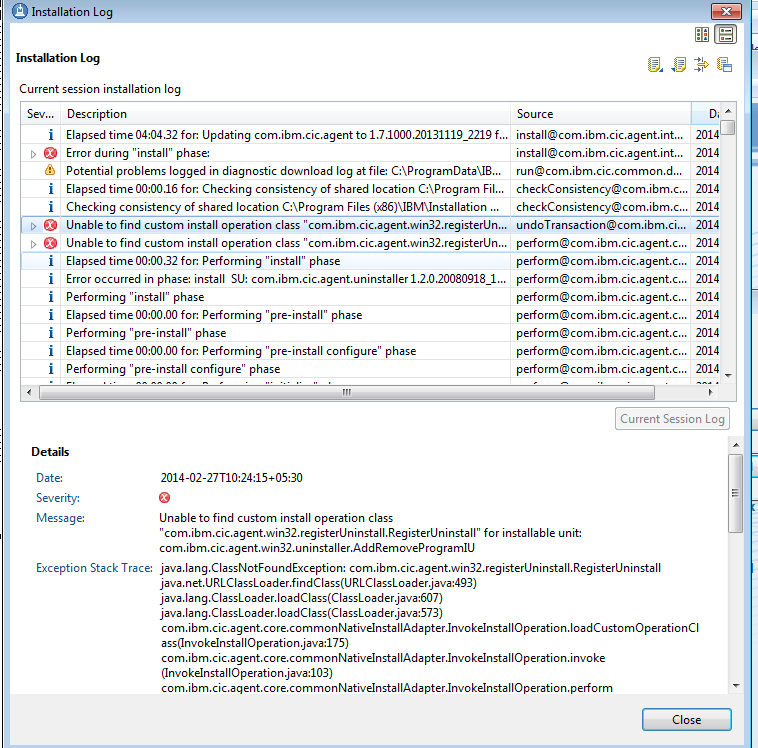
I have been trying to update Installation Manager on Windows 7 64-bit machine but I was getting below error-


Unable to find custom install operation class "com.ibm.cic.agent.win32.registerUninstall.RegisterUninstall" for installable unit: com.ibm.cic.agent.win32.uninstaller.AddRemoveProgramIU 
java.lang.ClassNotFoundException: com.ibm.cic.agent.win32.registerUninstall.RegisterUninstall
java.net.URLClassLoader.findClass(URLClassLoader.java:493)
java.lang.ClassLoader.loadClass(ClassLoader.java:607)
java.lang.ClassLoader.loadClass(ClassLoader.java:573)
com.ibm.cic.agent.core.commonNativeInstallAdapter.InvokeInstallOperation.loadCustomOperationClass(InvokeInstallOperation.java:175)
com.ibm.cic.agent.core.commonNativeInstallAdapter.InvokeInstallOperation.invoke(InvokeInstallOperation.java:103)
com.ibm.cic.agent.core.commonNativeInstallAdapter.InvokeInstallOperation.perform(InvokeInstallOperation.java:61)
com.ibm.cic.agent.core.AbstractInstallOperation.perform(AbstractInstallOperation.java:85)
com.ibm.cic.agent.core.InstallTransaction.performOperation(InstallTransaction.java:84)
com.ibm.cic.agent.core.InstallContext.performOperation(InstallContext.java:594)


After some R&D, I figure out four jars were missing in path C:\Program Files (x86)\IBM\Installation Manager\eclipse\lib 
Jars names are -
com.ibm.cic.agent.gdiPlus.jar
com.ibm.cic.agent.nativeAdminFixup.jar
com.ibm.cic.agent.win32.registerAgent.jar
com.ibm.cic.agent.win32.registerUninstall.jar

By placing this above jars on mentioned path, I was able to update Installation Manager.

Wednesday, February 26, 2014

"AppSrv01 is already in use. Specify another name" while profile has been deleted on Windows 7


I have deleted the profile through profile management tool and also manually going to the folder C:\Program Files (x86)\IBM\SDP\runtimes\base_v7\profiles but when I was trying to create a new profile it was giving me message "AppSrv01 is already in use. Specify another name" on Windows 7


I also tried to run the manageprofile command  
C:\Program Files (x86)\IBM\SDP\runtimes\base_v7\bin>manageprofiles.bat -delete -profileName profile_name
It through me error message:
INSTCONFFAILED: Cannot delete the profile. For more information, consult C:\Prog
ram Files (x86)\IBM\SDP\runtimes\base_v7\logs\manageprofiles\AppSrv01_delete.log

After going through with IBM website I came to know below steps and it worked perfectly fine

Before you delete a profile, stop its application server to ensure that the application server can be deleted.
You cannot delete a profile using the Profile Management Tool.


About this task

The following example attempts to delete a profile using the manageprofiles command, and then using operating system commands.

Procedure

  1. Issue the manageprofiles command to delete a profile.Substitute your profile name for the profile_name value in the following commands.
    ./manageprofiles.sh -delete 
                    -profileName profile_name
    
    manageprofiles.bat -delete 
                   -profileName profile_name
    If the command is successful, you have completed the task and can skip the remaining steps. If the command is partially successful or unsuccessful, proceed to the next step to delete the profile manually. If you receive the INSTCONFFAILED: Cannot delete profile. message, the command was unsuccessful. If the deletion is partially successful, you could receive message information similar to the following wording:
    INSTCONFPARTIALSUCCESS: The profiles no longer exist, but errors occurred. 
    For more information, consult 
    app_server_root/logs/manageprofiles/deleteAll.log.
    or
    The current user does not have sufficient permissions to detect or 
    remove services. If a service does exist, then an administrative or root user has 
    to remove it. If a service does not exist, then no further action is 
    required.
  2. Issue operating system commands to delete the profile directory.
  3. Issue the following command to remove references in the registry to deleted profiles:
    ./manageprofiles.sh -validateAndUpdateRegistry 
    
    manageprofiles.bat -validateAndUpdateRegistry
    Editing of the registry is not recommended.

Results

You have now deleted a profile.

Wednesday, May 15, 2013

WAS7- Exception when deploying EAR.


WAS7- org.apache.commons.fileupload.FileUploadException


org.apache.axis2.deployment.WarBasedAxisConfigurator <init> org.apache.commons.fileupload.FileUploadException


Caused by: java.lang.ClassNotFoundException: org.apache.commons.fileupload.FileUploadExceptionat java.lang.Throwable.<init>(Throwable.java:80)at java.lang.ClassNotFoundException.<init>(ClassNotFoundException.java:76)

Above is the exception which I was getting with my WAS7 server when deploying the war. I was so sure that there is no jar or any file missing. There was also no conflict with jars. Select 


Finally I did some hit an trail. Did some changes in application.xml (Java EE> Open WebSphere Application Server Deployment) and changed the class-loader mode to PARENT_LAST, and also set the WAR class-loader policy in the WebSphere deployment editor to ‘APPLICATION’.


and poof! my exception was gone and I was able to run my WAS7 server without any exception.


Select Java EE > Open WebSphere Application Server Deployment.

Expand the Application section. 

Thursday, April 11, 2013

Eclipse blinks and disappear

I was trying to run eclipse from every possible way, but it always disappeared after a short blink-


I also figured out java wasn't 

Sunday, February 3, 2013

Tomcat not starting from eclipse

I had problem with starting Tomcat from eclipse  Even though there is no log errors. When I launched from the command line using run.sh or starts from 'services', it seems to be working fine. But if i use eclipse (with or without app) tomcat wouldn't start and gives me 404 error.


I solved this problem by performing the following steps-

1. In Eclipse, go to the 'Servers' tab.
2. Double click on the server.
3. A configuration overview should be displayed in the main Eclipse panel.
4. Under the sub-section 'Server Locations', 
select the radio button 'Use Tomcat  Installation'. (It was 'Use workspace metadata' which was causing me  
5. Save the configuration (you should be prompted to do so anyway).
6. Restart your server, and you should find localhost:8080 works from within the Eclipse browser.
                   

Hope it helps.